Jan Soochna Portal Rajasthan: Pension, Ration, PM Kisan & FIR Status List
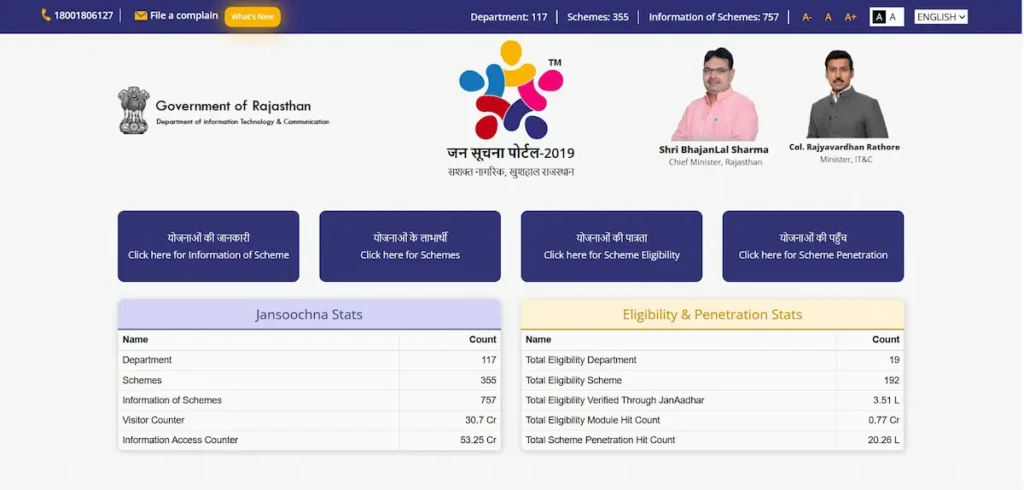
The Jan Soochna Portal acts as the official public disclosure network for the Government of Rajasthan. Built to enforce Section 4(2) of the Right to Information Act 2005, the platform bypasses the traditional delays of RTI filings by making state data immediately accessible. It operates as an independent public authority tracker, giving citizens a direct tool to verify public accountability and welfare delivery. Users can extract live, localized records spanning 117 departments, 355 schemes, and 757 informational services. The system requires no user credentials. The database remains entirely open, removing the need to register accounts or supply security passwords to access standard public information.
Quick Action Links: Track Direct Status & Official State Portals
Official Overview of the Rajasthan Public Information Platform
The Rajasthan State Government activated the digital tracker in September 2019. The administrative foundation originates from the Jawab Dehi Kanoon (Accountability Law) proposed in the 2019 State Budget Paper. By mandating proactive disclosure, the framework shifts the burden of information availability from the citizen to the state. This legal mandate eliminates the manual overhead of physical RTI filings, ensuring citizens avoid long bureaucratic wait times to view administrative actions.
The architecture of the platform enforces direct administrative responsibility. It aggregates state records into a central directory, giving local residents the exact data needed to conduct a social audit of community funding and individual resource distribution. By indexing approved public oversight materials, the system secures data integrity across all welfare delivery channels. The tracker does not push real-time synchronization; it publishes periodic data batches uploaded by the respective managing departments. This matches the exact legal parameters of proactive state information without overstating the technical capabilities of the government servers.
The Four Official Routes to Find Information
The official interface of the platform divides data access into four distinct pathways. This structure aligns directly with specific citizen search queries, ensuring users extract exact parameters without sorting through unrelated public records.
1. Scheme Information (योजनाओं की जानकारी)
This pathway outlines the operational blueprint of state programs. Citizens use this module to look up structural policy guidelines, required document checklists, criteria rules, and contact information for the specific departments managing individual benefits. This sector handles the operational mechanics of a benefit, showing how a program functions rather than publishing individual recipient names.
2. Scheme Beneficiaries (योजनाओं के लाभार्थी)
This route serves as the active public ledger tracking transaction outcomes. It indexes individual and regional benefit distributions, verification approvals, and active payment records. Citizens use this data funnel to search for exact names, verify financial clearances, and confirm if cash or commodity transfers reached the intended individuals under state welfare programs.
3. Scheme Eligibility (योजनाओं की पात्रता)
This automated evaluation system maps user attributes against program requirements. By parsing family dataset parameters linked to the Jan Aadhaar identification token, this route computes whether a household qualifies for a specific scheme before a citizen files a formal application. This path serves to identify pre-qualification gaps before entering the enrollment phase.
4. Scheme Reach and Penetration (योजनाओं की पहुँच)
This data engine generates systemic coverage statistics through interactive geographical charts and district-level matrices. It details public budget distribution, resource allocation densities, and total enrollment volume from the state level down to specific gram panchayats and village limits, allowing public observers to evaluate infrastructure delivery.
Clear Portal Distinctions: Jan Soochna, SSO ID, and e-Mitra
Citizens frequently experience confusion by treating separate public portals as interchangeable platforms. Rajasthan’s digital governance framework relies on independent technical nodes that perform completely separate administrative tasks. Attempting to apply for a program on a public tracking index, or searching for public lists inside an application window, leads to navigation errors.
Public data lookup does not require identity authentication. Conversely, submitting formal scheme applications or executing state financial transactions demands secured access through unique citizen accounts or licensed service centers.
| Digital System | Primary Use Case | Login Required? | Access Method |
| Jan Soochna Portal | Public data lookup, tracking payouts, viewing lists. | No (Open public dashboard) | Web browser or mobile app |
| Rajasthan SSO ID | Filling out new scheme applications, examinations. | Yes (Requires username/password) | Individual citizen account |
| e-Mitra Kiosk | Physical application submissions, cash transactions. | Yes (Operator login required) | Physically assisted local center |
| Rajasthan Sampark | Filing formal complaints against delayed services. | No / Optional (Mobile OTP verification) | Grievance platform tracking |
Personal Information vs. Regional Statistical Records
The Jan Soochna framework separates public data extraction into two distinct lookup models. Choosing the correct model depends entirely on whether you need to isolate a specific citizen’s file or audit the welfare distribution across an entire community.
Tracking Personal Records via Individual Identifiers
To extract a specific case history, you must supply an explicit, unique identification key. These input requirements are strictly scheme-dependent. For example, tracking an employment roster requires a Job Card Number, while checking a food subsidy requires a Ration Card ID. Entering this precise identifier isolates your specific data from the broader public ledger, allowing you to track direct application approvals and personal transaction histories.
Extracting Localized Geographic Reports
When you lack an individual identification number, or when you need to audit community-wide welfare delivery, the system utilizes a localized geographic tracking model. This method extracts complete ledger sheets for specific areas without requiring individual names. To pull these community reports, the search system requires you to follow this exact downward filtering path:
State of Rajasthan → District → Block / Urban Local Body → Gram Panchayat / Ward → Village / Local NeighborhoodCompleting this geographic matrix generates the complete public list of beneficiaries and active resource allocations for that specific zone.
Requirements for Top Public Welfare Services
To pull accurate records from the database, you must align your query with the correct governing department and provide the designated input keys. Below are the verified verification sequences for the highest-volume public welfare services.
Social Security Pension Payment Status (RajSSP)
- Target Department: Social Justice and Empowerment Department
- Required Inputs: Pension Payment Order (PPO) Number or Jan Aadhaar Card
- Verification Steps:
- Navigate to the official Jan Soochna services directory and open the Social Security Pension module.
- Enter your precise PPO Number or Jan Aadhaar ID.
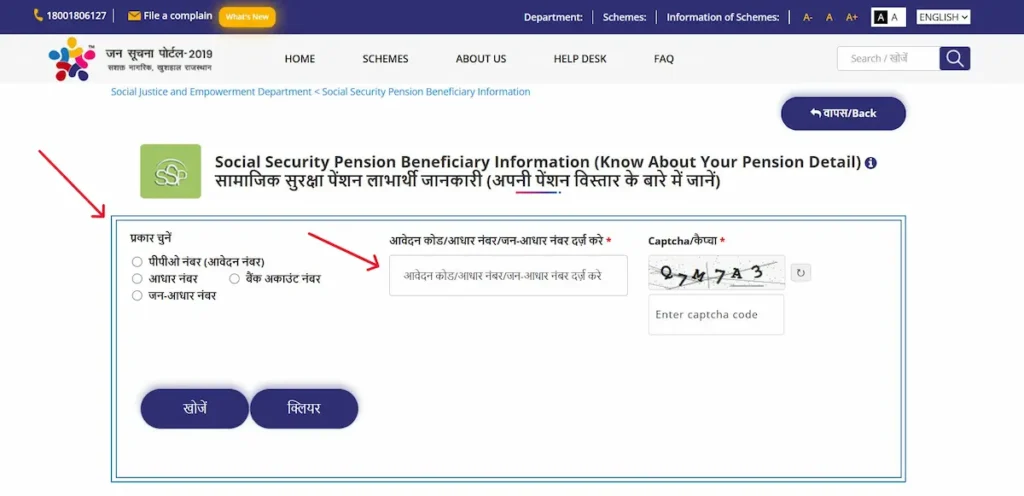
- Audit the monthly ledger to track financial year releases and bank clearance dates.
- Check the status column to find specific unverified, suspended, or canceled indicators that halt disbursements.
Public Distribution System Ration Card and NFSA Verification
- Target Department: Food and Civil Supplies Department
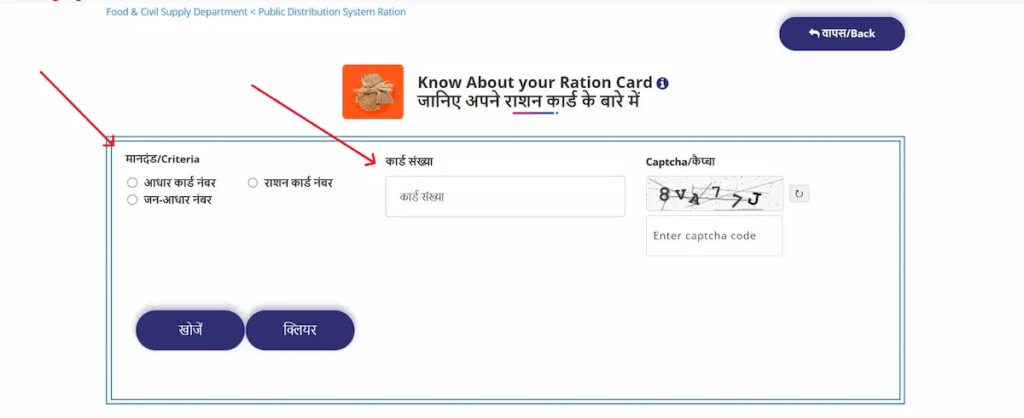
- Required Inputs: Ration Card Number or Aadhaar Number
- Verification Steps:
- Access the Know About Your Ration Card tracking panel at jansoochna.rajasthan.gov.in/Services.
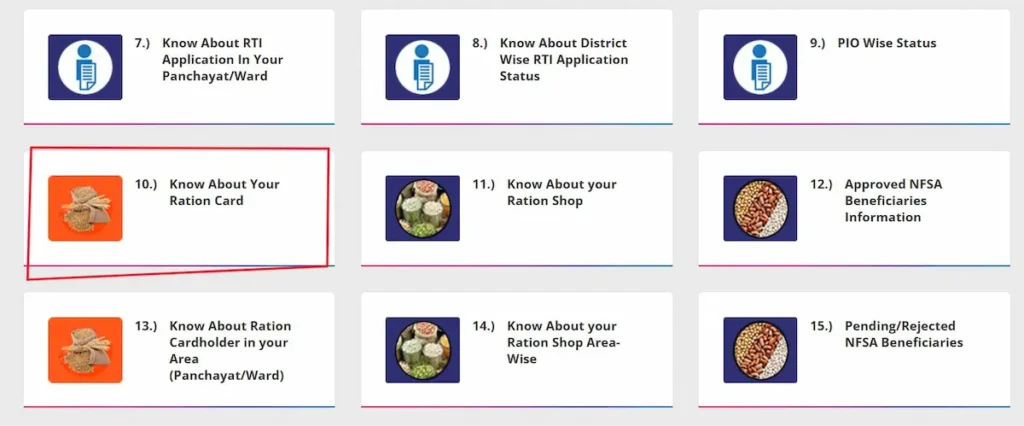
- Input the Ration Card Number to load the household ledger.
- Verify the National Food Security Act (NFSA) status line to confirm if the profile is approved, pending, or rejected.
- Track the Fair Price Shop (FPS) allocation paths to view exact commodity distribution weights and active pickup logs.
PM Kisan Samman Nidhi Records
- Target Department: Agriculture Department
- Required Inputs: Application Number or Jan Aadhaar Number
- Verification Steps:
- Select the PM Kisan Samman Nidhi data funnel.
- Enter the active Application Number or family Jan Aadhaar Number.
- Extract the landholder beneficiary status directly from the synchronized state records.
- Review the transaction table to map specific instalment release cycles and confirmed bank deposit dates.
Rajasthan Police FIR Status Tracker and Downloads
- Target Department: Rajasthan Police Department
- Required Inputs: District, Police Station, FIR Number, and Year
- Verification Steps:
- Open the Rajasthan Police public module via the state services index.
- Follow the mandatory filter path: Select your exact District, then select the local Police Station.
- Enter the specific FIR Number and the registration Year.
- Track the ongoing case progress or download the authorized public copy of the FIR document.
MGNREGA Job Card and Gram Panchayat Muster Rolls
- Target Department: Rural Development and Panchayati Raj Department
- Required Inputs: Job Card Number
- Verification Steps:
- Enter the MGNREGA tracking dashboard.
- Supply the alphanumeric Job Card Number to isolate the active employment profile.
- Extract the local Gram Panchayat work progress sheets and active Muster Rolls (worker attendance rosters).
- Track the direct wage transaction statuses and matched bank account transfer receipts.
Palanhar Yojana Application Approvals
- Target Department: Social Justice and Empowerment Department
- Required Inputs: Jan Aadhaar ID or Palanhar Application Number
- Verification Steps:
- Locate the Palanhar Yojana tracker in the centralized services list.
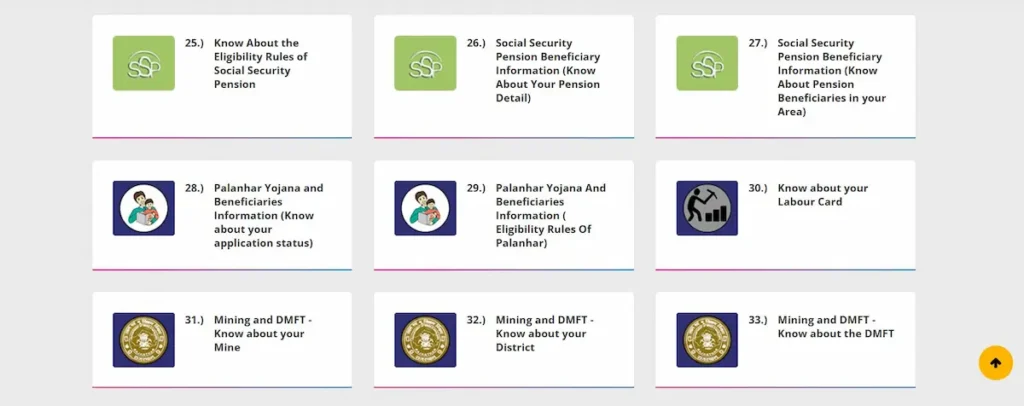
- Input the application tracking number or master Jan Aadhaar ID.
- Verify the core application approval status for the vulnerable children welfare allowance.
- Track the required annual renewal confirmations (such as school attendance verification) to identify blocks causing payment pauses.
Mukhyamantri Ayushman Arogya Yojana Registration
- Target Department: Department of Medical, Health and Family Welfare
- Required Inputs: Jan Aadhaar ID
- Verification Steps:
- Select the updated Mukhyamantri Ayushman Arogya Yojana panel (Note: This indexes the 2026 policy naming convention update, formerly Chiranjeevi Health Insurance).
- Input the primary Jan Aadhaar ID to pull the household medical coverage framework.
- Verify the active cashless treatment status and current health card validity.
- View the localized list of empaneled private and public hospitals authorized for treatment under your policy.
State Clarifications: Is There an Official Jan Soochna Portal for UP or Bihar?
The “Jan Soochna Portal” brand and its specific proactive disclosure framework are exclusive administrative developments of the Government of Rajasthan. There is no official digital system named “Jan Soochna Portal” run by the state governments of Uttar Pradesh or Bihar. Search queries targeting these regions reflect a mismatch of regional platform names.
To track public records, file grievances, or check service statuses in those specific states, you must navigate to their separate, dedicated state nodes:
- For Uttar Pradesh Searchers: The state handles public grievances and regional scheme monitoring through the official Jan Sunwai Portal. Use this destination to trace administrative complaints and verify local department allocations.
- For Bihar Searchers: The state hosts its public records directories and active service tracking under the official RTPS Bihar Portal. This platform allows users to track statutory certificates and welfare application lines directly.
Fixes for Common Portal Failures and Error Messages
Technical disconnects between individual department servers and the central data warehouse can trigger interface errors. The tracking matrix below outlines the exact administrative causes and concrete data correction paths for frequent portal issues.
| Error Message / Status | Root Cause | Practical Resolution Path |
| “Record Not Found” | The input identification key contains a structural typo, or the managing department has not completed the upload cycle for the current financial period. | 1. Re-enter the string to check for trailing spaces or misplaced alphanumeric characters. 2. If the key is correct, switch to the localized geographic lookup route for your Gram Panchayat to verify if the department’s regional dataset has been refreshed. |
| Beneficiary Missing Post-Approval | The file is blocked by an Aadhaar seeding mismatch or an incomplete family e-KYC validation error within the core Jan Aadhaar database. | 1. Log in to your authenticated personal SSO panel or visit a physical e-Mitra kiosk. 2. Submit updated biometric or demographic updates to align your identity tokens across the state registry. |
| Server Timed Out | High traffic load on the parent department’s database node prevents the central tracker from pulling the ledger sheet. | Do not resubmit the form repeatedly. Clear your browser cache, avoid peak daytime hours, and attempt the lookup during low-traffic windows. |
Safety Protocol: Data Protection on Public Platforms
Because the official database operates on a model of open public accountability, safeguarding personal security details is an absolute requirement for users.
Critical Privacy Directive: The official lookup tools require public identifiers (such as a PPO number or a Ration Card ID), but they will never request a security PIN or account password. Never share your mobile OTP codes, private account passwords, or financial credentials on any public tracking board, social media group, or unverified feedback forum.
This platform operates strictly as an independent informational index and educational resource. It does not collect personal identification documents, store private security profiles, or execute third-party application forms. Always verify that your browser address line displays the authentic .gov.in suffix before entering any public tracking workflow.
Frequently Asked Questions
Is a user login ID required to check information on the Jan Soochna Portal?
No. The official platform operates under a proactive public disclosure mandate and does not require an SSO ID, user log-in, registration, or profile password for standard lookups. Any citizen can access the open data dashboard immediately.
How can I update my wrong payment details showing on the list?
You cannot modify database listings directly on the Jan Soochna tracking board. Data correction must be submitted directly to the managing department via a local e-Mitra kiosk or your authenticated SSO account. To escalate unresolved corrections, register a complaint via the Rajasthan Sampark grievance helpline (181).
What is the main official website address for the portal?
The authentic government link is jansoochna.rajasthan.gov.in. Always verify the .gov.in suffix in your web browser before accessing any online public records to avoid unverified third-party data collection sites.
Can I submit a formal Right to Information (RTI) application through Jan Soochna?
No. This specific platform strictly publishes pre-approved, proactive datasets to reduce the need for standard manual applications. To file a fresh, legally binding data request, you must use the separate, official Rajasthan RTI web portal.